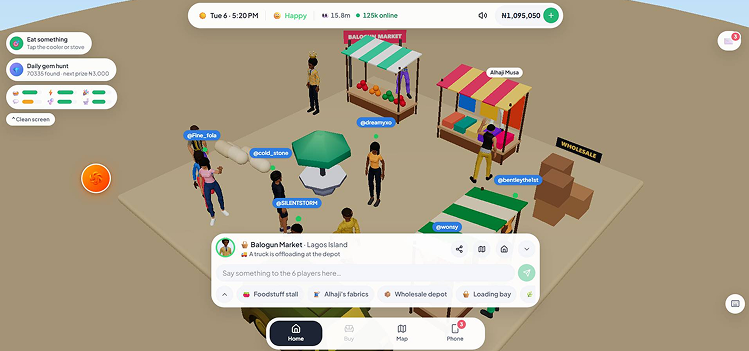
Lagos Life is an 18+ game under its official Terms of Service. This walkthrough follows the public game interface and configuration as checked on 4 October 2026. Buttons, rewards and timings can change with updates, so treat the numbers as a reference rather than a promise.
| Your next task | Where to look | How you know it worked |
|---|---|---|
| Join the game | The sign-up screen on the official website | You reach character creation, or your saved life loads |
| Finish your Sim | Look, Personality, Dream and Birth lottery | The game shows your origin and your home |
| Find employment | Phone ? Jobs | A job title, a performance bar and your next shift appear |
| Start a shift | Go to work | The work screen and shift progress appear |
| Protect your money | Phone ? Bank | Your balance covers the next bills |
1. Create an account you can recover
Use Safari or Chrome. If you tapped a link inside Instagram, X or WhatsApp and the login keeps dropping, choose that app's Open in browser option, or copy the official address into your browser. The official game link guide explains which address to trust.
On the sign-up form:
- Enter your name and a username. Usernames can be 3–20 letters, numbers or underscores, with no spaces.
- Choose a password of at least 6 characters.
- Add a recovery email if you can. It is optional, but without it you cannot reset your password by email.
- Confirm you are 18 or older and accept the terms.
- Submit. If a field turns red, fix that field before trying again rather than resubmitting the whole form.
Forgot your password later? Forgot password? works only for accounts with a recovery email. If registration or login still fails, the developer asks players to email [email protected] with the error and your username — never your password.
Want an app-style icon? That is optional for this walkthrough; the phone and home-screen guide covers iPhone, Android and computers.
2. Make your Sim and choose two traits
Character creation runs in this order: Look ? Personality ? Dream ? Birth lottery ? Home. If the birth lottery makes you a Nepo Baby, you skip the normal home choice and move straight into the Lekki home.
The Personality screen needs exactly two traits before it lets you continue. Each trait supports one skill, and skills are what unlock promotions later, so pick at least one trait that matches the career you want:
| Trait | Skill it supports | Careers that promote with that skill |
|---|---|---|
| Tech Bro or Sis | Coding | Tech |
| Smooth Talker | Charisma | Banking, Content Creator, Teaching, Football, Retail |
| Hustler | Hustle | Trading, Hairstyling, Event Planning |
| Gym Rat | Fitness | Nursing, Fitness Coach |
| Foodie | Cooking | Chef |
| Musical | Music | Music, DJ |
These are helpful pairings, not entry requirements — any Sim can apply for any career. Use your second trait for the activities you actually enjoy. At the Dream stage, read each goal before confirming: career progress, wealth, music, friendships and startup funding all ask for different things.
The birth lottery decides Nepo Baby or LAPO Baby once per account. Starting a new life does not reroll it. The two starts come with different jobs, homes, bills and cash — see Nepo Baby vs LAPO Baby before you plan a budget.
3. Choose a home and protect the next bill
A LAPO Baby chooses between two opening homes. The starting cash already includes the LAPO loan:
| Home | Starting cash (incl. loan) | Weekly rent | Rent + one normal LAPO payment |
|---|---|---|---|
| Mushin: Face-me-I-face-you | ?76,000 | ?2,400 | ?14,400 |
| Yaba: Self-contain | ?96,000 | ?6,000 | ?18,000 |
Mushin keeps the bill that comes back every week lower. Yaba hands you more cash and more space up front, but that extra cash does not cancel out its higher rent. Both homes already include basic household items, so look around what you own before buying replacements.
Rent is taken on Saturday morning. The LAPO loan is collected on its own seven-day cycle, which may not land on a Saturday. Keep enough for both. A Nepo Baby starts with Daddy covering the Lekki rent, subject to conditions explained on the comparison page.
4. Get a job and use Go to work
- Open Phone ? Jobs and compare each career's skill, working days and pay. The jobs and salaries guide lists every level.
- Pick a career and tap Apply — start tomorrow. The Jobs panel should now show your job and next shift.
- On a scheduled working day, look for Go to work. The game's help says it appears from 6 AM and sends your Sim to work without you finding the venue yourself.
- Complete the shift tasks and let the shift finish. The summary shows your pay and performance — then check Bank to see the balance change.
The Jobs panel describes 1-hour shifts: a full shift is 60 game minutes, not a real hour. Go to work is available from 06:00 until before 22:00 on a working day, and starting work deducts up to ?150 for transport.
| What you see | What to check |
|---|---|
| No job in the panel | Apply first, then confirm the job title appears |
| Go to work is missing | Is it a working day? What does the game clock say? Is today's shift already done? |
| Your Sim is travelling or already working | Let that activity finish, then check again |
| Your Sim is in a cell or seriously sick | Resolve the condition the game shows — serious sickness blocks work |
| Full performance, but no promotion | Train the career's required skill; performance alone is not enough |
Leaving a shift early can reduce your pay. Switching careers restarts you at level 1 in the new career, so check the pay change before confirming.
5. Keep the six needs usable
| Need | What to do | How you know it worked |
|---|---|---|
| Hunger | Eat or prepare food | Hunger rises |
| Energy | Sleep in your bed or on a mattress | Energy rises while resting |
| Hygiene | Use a washing or bathing action | Hygiene rises |
| Bladder | Use the toilet | Bladder rises |
| Fun | Choose a leisure or music activity | Fun rises |
| Social | Start a conversation or social activity | Social rises |
Top up low needs before you start a shift or a long activity. If a powered household action reports NEPA took light, use an alternative or restore power before trying again — buying an appliance does not guarantee it works during an outage.
6. Turn the first payday into progress
After your shift, check Bank, keep the next bills covered and start training the skill your next promotion needs. Spare time between shifts can go into a side gig. A business only makes sense once its price still leaves money for living costs and a bad day.
When you are ready to move beyond wages, the money guide walks through gigs, businesses and land in a sensible order. Bigger homes bring bigger rent: moving into Ikoyi or Banana Island later does not remove the weekly bill.